HubSpot Integration
The HubSpot integration pushes Alium buyer intelligence directly onto the company records in your HubSpot portal. When Alium publishes an interview with a company that also exists in your HubSpot, that company's record is enriched with Alium data and a timeline event — so your sales and marketing teams see buyer insight without leaving their CRM.
The integration is read-from-Alium, write-to-HubSpot and non-invasive: it only ever updates companies that already exist in your HubSpot, and only with Alium-owned properties. It never creates, deletes, or overwrites your existing HubSpot data.
Available on Enterprise plans. Contact us at help@alium.io to enable it for your team.
Setup
A team admin connects the integration once:
- Go to app.alium.io/account/hubspot.
- Click Connect HubSpot.
- Authorize Alium in the HubSpot OAuth screen. You must approve all requested permissions.
- You're redirected back to Alium with the connection confirmed.
On connect, Alium automatically:
- Creates the custom company properties listed below (under the Company Information group).
- Registers the Alium Transcript Published timeline event.
- Runs an initial backfill across every company you already have Alium interviews for, matching them to your HubSpot companies by domain.
Permissions requested
| Scope | Why |
|---|---|
| Read & write companies | Find matching companies by domain and write Alium properties to them |
| Read & write company schemas | Create the custom Alium properties |
| Behavioral events (read/write + send) | Register and send the transcript timeline event |
Alium requests only company-level access. It does not request access to your contacts, deals, tickets, or any other HubSpot object.
What you see in HubSpot
Company properties
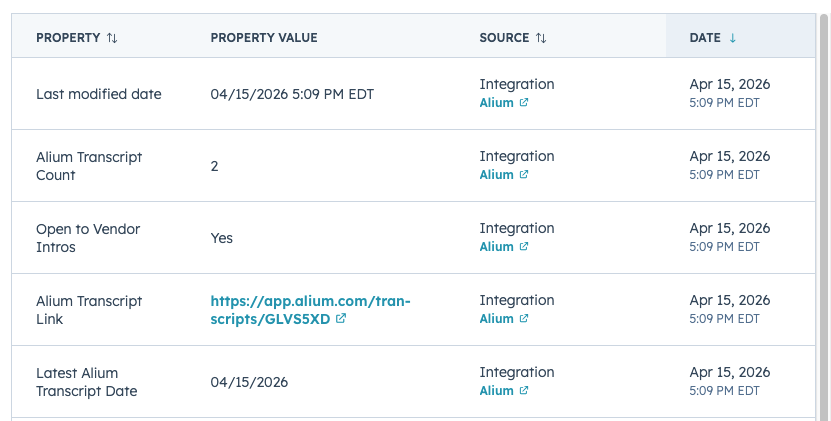
Four custom properties are added to every matched company record:
| Property | Description |
|---|---|
| Alium Transcript Link | Direct link to the company's most recent Alium interview |
| Alium Transcript Count | Number of Alium interviews available for the company |
| Latest Alium Transcript Date | When the most recent interview was published |
| Open to Vendor Intros | Whether an interviewee from this company is open to an intro request |
Transcript timeline event
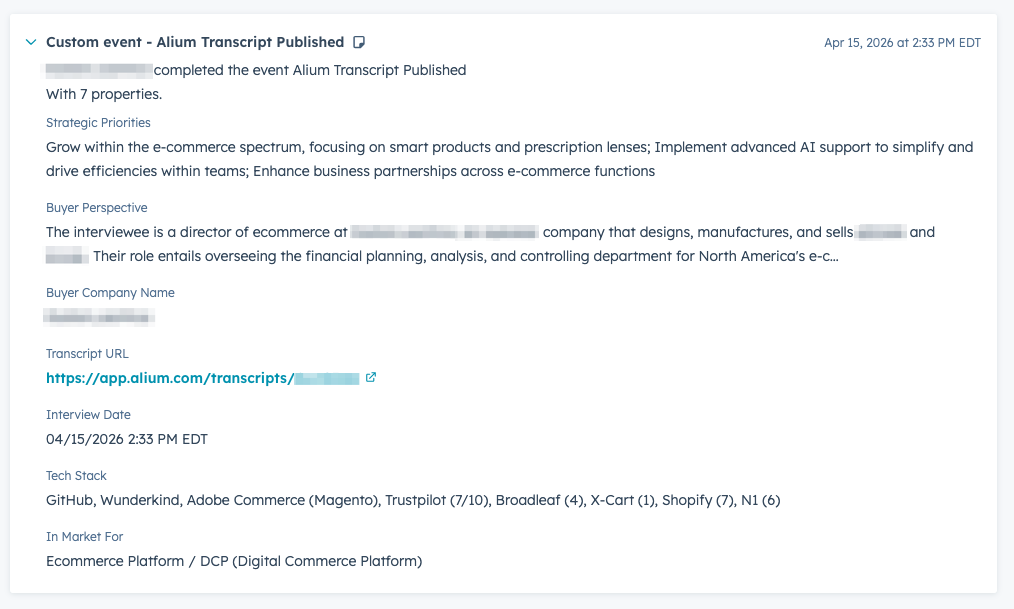
Each time a new interview is published for a matched company, an Alium Transcript Published event is added to that company's timeline, carrying:
| Field | Description |
|---|---|
| Buyer company name | The interviewed company |
| Interview date | When the interview took place |
| Transcript URL | Link to the full interview in Alium |
| In market for | Use cases the buyer is evaluating |
| Buyer perspective | AI summary of the buyer's point of view |
| Tech stack | Vendors and products the buyer uses (with ratings) |
| Strategic priorities | The buyer's stated priorities |
Customizing the experience
The Alium properties and the timeline event are fixed — Alium owns and maintains their definitions, so you don't manage their schema. But once the data lands in HubSpot, it's standard HubSpot data, and you can use all of HubSpot's native tooling on top of it:
- Add the Alium properties to company record sidebars, list views, and cards.
- Build active lists segmented by, say, "companies with an Alium interview in the last 30 days" or "open to vendor intros."
- Trigger workflows off the properties or the timeline event (e.g. notify an account owner when a new transcript lands).
- Report on Alium coverage across your book of business.
If you'd like Alium to sync additional fields, let us know — the property set is something we extend based on customer demand.
How matching works
Alium matches companies to your HubSpot by website domain. When an interview is published, Alium searches your HubSpot for a company whose domain matches the buyer's company domain.
- Match found → that company's Alium properties are updated and a timeline event is added.
- No match → nothing happens. No company is created, no record is touched, nothing is sent. The interview simply isn't reflected in your HubSpot (until a matching company exists).
Companies with consumer/free-email domains (gmail.com, etc.) and ambiguous matches (a domain that resolves to more than one Alium company) are skipped to avoid writing to the wrong record.
Alium never creates companies in your HubSpot. If a buyer isn't already a company in your CRM, the interview won't appear there. This keeps the integration safe to turn on — it can't pollute your CRM with records you didn't choose to track.
When it syncs
The integration is event-driven, not on a fixed schedule — there is no nightly batch. A company's Alium data updates in near real time in three situations:
| Trigger | What happens |
|---|---|
| You connect the integration | One-time backfill matches all of your existing Alium interviews to HubSpot companies. |
| A new interview is published | The interviewed company is matched and its properties + timeline event update immediately. |
| You add or update a company in HubSpot | Alium is notified, checks whether it has interview data for that company's domain, and syncs it right away if so. |
That third path is how you "pull in" a company that wasn't in HubSpot when the interview was published:
Getting data for a company that isn't in HubSpot yet
If Alium has already interviewed a company but it didn't sync (because it wasn't in your HubSpot at the time), simply create that company in HubSpot with its correct domain. Alium is notified of the new company, checks for matching interview data, and backfills the properties and timeline event within moments — no waiting for a scheduled job, no manual re-sync.
What is not synced
- Vendor profiles. The integration syncs buyer/interviewee company intelligence only. Alium vendor profiles are not pushed to HubSpot, even if you keep vendors as companies in your CRM.
- Contacts / people. Alium writes to company records only — no contact or person records are created or modified.
- Any non-company object. Deals, tickets, and other objects are never touched.
Connection status & disconnecting
The HubSpot settings page shows your connection status, when data last synced, and how many companies are currently matched.
To turn the integration off, click Disconnect HubSpot. Alium stops syncing immediately. The Alium properties and any data already written to your company records remain in HubSpot (Alium doesn't delete them) — they simply stop updating.
If your HubSpot connection ever expires (for example, if access is revoked in HubSpot), Alium pauses syncing and the settings page prompts you to Reconnect. Reconnecting resumes syncing where it left off.